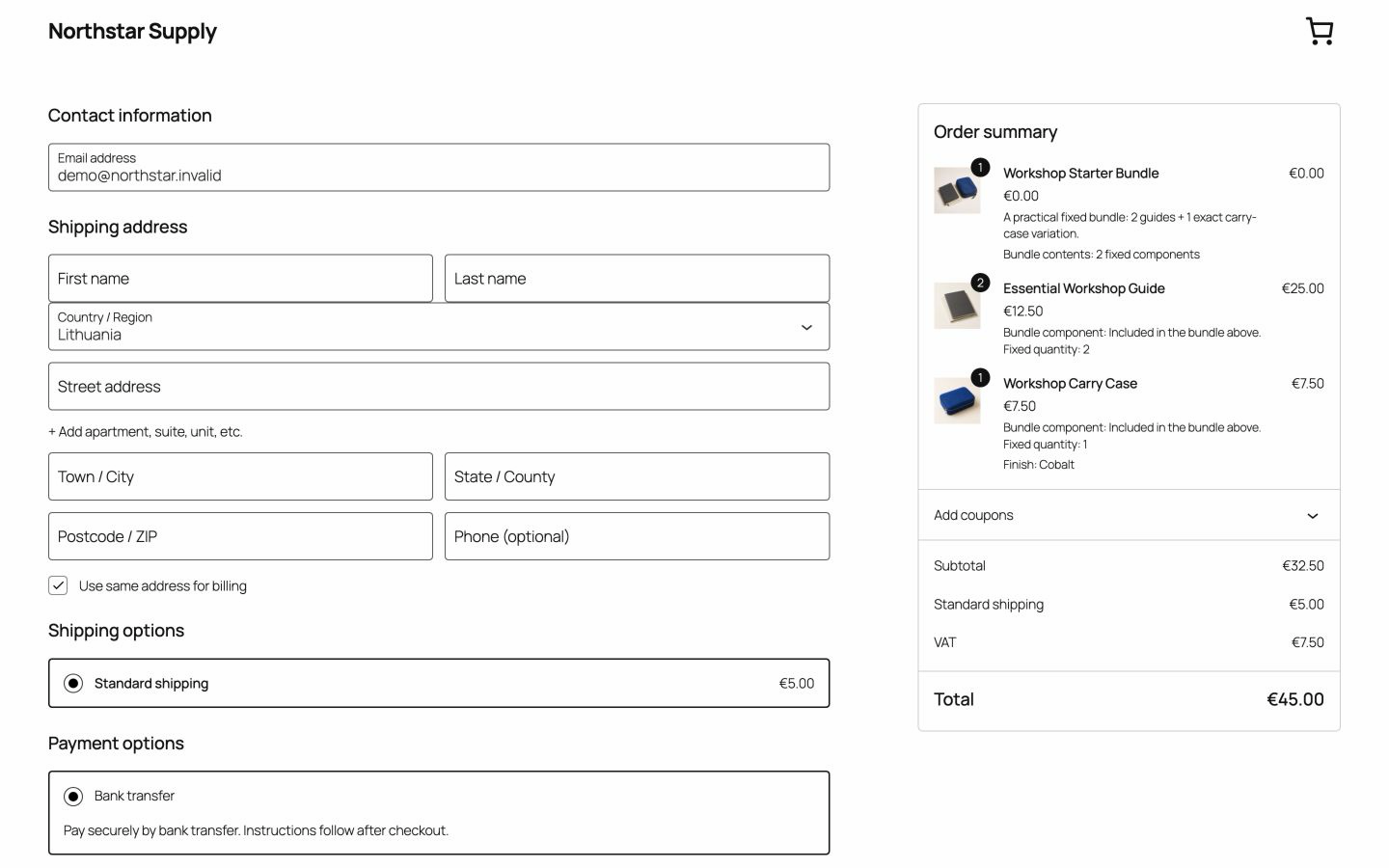
Zero-value bundle line
The parent order line shows the bundle name with a zero subtotal, total, and tax value.
Updated
The bundle price is the sum of every required component's current WooCommerce price multiplied by its fixed quantity. When you change the price of an included product, the bundle total follows.
v0.1.0 · 54 KB · WordPress 6.8+ · WooCommerce 9.9+ · PHP 8.2+ · GPL-2.0-or-later
Opens the GitHub release page.
Need help installing? Follow the installation steps.
You sell a notebook and two blue marker sets as one starter kit. Shoppers see one kit total of €21.00, built from the current item prices.
You manage each price in one place. When the marker set goes on sale in WooCommerce, the kit total uses the sale price.

The bundle line groups the purchase. The component lines carry the price, so the kit is charged once.
The parent order line shows the bundle name with a zero subtotal, total, and tax value.
Every required item keeps its own current price, quantity, tax class, shipping data, and stock behavior.
Orders keep each purchased component and its financial values for later review or refund.
Your WooCommerce settings apply to each component line. Test the combinations you sell on a staging site before you go live.
New to bundles? Follow the setup guide to create your first bundle.
| Area | Bundle behavior | What to test |
|---|---|---|
| Tax classes and rounding | Each component keeps its WooCommerce tax class. Display and rounding follow the store's tax settings. | Tax-inclusive or tax-exclusive display, mixed classes, and the final checkout total. |
| Coupons | Eligible WooCommerce coupons apply to component lines according to coupon type and restrictions. | Product and category restrictions, excluded sale items, minimum spend, and free-shipping coupons. |
| Shipping | Physical components keep their weight, dimensions, shipping class, and other shipping data. | Each shipping method, mixed classes, free-shipping thresholds, and the zones you serve. |
| Orders and refunds | Use the normal WooCommerce refund controls on the affected component lines. You choose whether to restock refunded items. | A partial refund, a full refund, and the restock result for each item. |
Yes. The total uses each component's current WooCommerce price, including an active sale price.
Advanced Bundles Free always uses the sum of the component prices. A separate bundle price or bundle discount is not included. See what Free includes.
Yes. Eligible coupons apply to the component lines according to the coupon type and restrictions.
Yes. Each component has its own order line. Use the normal WooCommerce partial refund on that line, and choose whether to restock it.
Also from we-wp: Advanced Invoices creates numbered PDF invoices from your WooCommerce orders. Advanced Quotes turns price requests into paid orders.
Want the full picture? See what Advanced Bundles Free includes.
Download Advanced Bundles Free and install it on a staging site. Then test a bundle with your real tax, coupon, and shipping settings.
v0.1.0 · 54 KB · WordPress 6.8+ · WooCommerce 9.9+ · PHP 8.2+ · GPL-2.0-or-later
Opens the GitHub release page.
Need help installing? Follow the installation steps.