Updated
Free WooCommerce Product Bundles alternative for fixed kits
Advanced Bundles Free sells ready-made kits. You choose the products and quantities, and shoppers add the complete kit with one button.
It is not a drop-in replacement for Product Bundles for WooCommerce®, by Woo®, and does not claim feature parity.
Advanced Bundles Free is made by UAB BusinessPress. It is not made, sponsored, or endorsed by WooCommerce. WooCommerce®, Woo®, and their associated designs are trademarks of Automattic Inc.
v0.1.0 · 54 KB · WordPress 6.8+ · WooCommerce 9.9+ · PHP 8.2+ · GPL-2.0-or-later
Opens the GitHub release page.
Need help installing? Follow the installation steps.
Useful for your store? Star Advanced Bundles on GitHub. (opens in new tab)
Example: a workshop starter kit
You sell notebooks and marker sets separately. You want one starter kit with a notebook and two blue marker sets.
Create one Bundle product. Choose the notebook, the Blue variation of the marker set, and the quantities. Shoppers then add the complete kit with one button.
- The kit price is the sum of the current item prices.
- The cart checks the total stock needed for each item. Checkout checks it again.
- Each item keeps its own price, tax, shipping, and order line.
- Item refunds use WooCommerce refunds and restore stock once when requested.
- Classic checkout, Cart and Checkout Blocks, and HPOS are covered by the published compatibility checks.

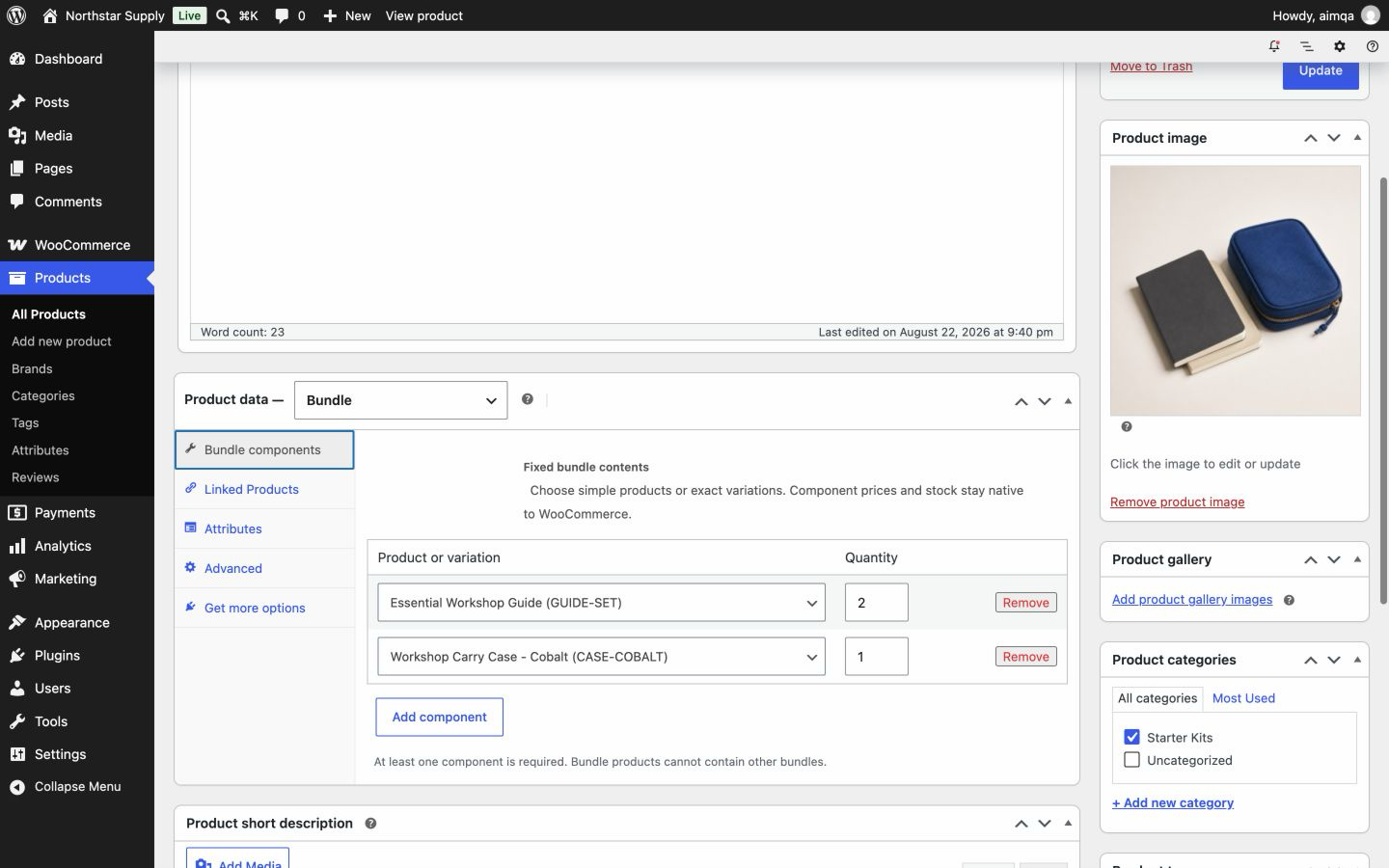
Compare the fixed-kit scope
Advanced Bundles Free focuses on fixed kits. Product Bundles for WooCommerce, by Woo, has a broader feature set. Use its documentation for current behavior.
| Need | Advanced Bundles Free | Official extension |
|---|---|---|
| Fixed products and quantities | Yes. Add simple products or exact variations, and set one quantity for each. | Available. Check the official setup and quantity documentation. |
| Shopper choices or optional items | Not included. Every shopper buys the same kit. | Documented for supported bundle configurations. |
| Pricing | The sum of each item's current price multiplied by its quantity. | Includes broader pricing and discount controls. Check the current product page and documentation. |
| Subscriptions or assembled-product workflows | Not included. | Check the official extension chooser and integration documentation for the required workflow. |
Try one kit on a staging site
A staging site is a test copy of your store.
Read the full setup guide-
1. Install the ZIP
Open Plugins → Add New Plugin → Upload Plugin. Select the ZIP, then install and activate it.
-
2. Create one bundle
Add a Bundle product. Choose the products or exact variations, and enter the quantities.
-
3. Place a test order
Check the cart, checkout, stock, order lines, tax, and shipping. Then test a refund.
Free alternative questions
Can I include a specific size or colour?
Yes. Choose one exact variation for each item, such as the Blue marker set. To sell another colour, create a second bundle product.
Can I set a bundle discount or a fixed bundle price?
Free prices each kit as the sum of the current item prices. A separate bundle price or discount is not included. See what Free includes.
Can I import bundles from Product Bundles for WooCommerce?
There is no migration tool. Create each kit as a new Bundle product, then test it on a staging site.
Related guides
Also from we-wp: Advanced Invoices creates numbered PDF invoices from your WooCommerce orders. Advanced Quotes turns price requests into paid orders.
Want the full picture? See what Advanced Bundles Free includes.
Sell your first fixed kit
Get Advanced Bundles Free, or try the same fixed-kit flow in your browser first.
v0.1.0 · 54 KB · WordPress 6.8+ · WooCommerce 9.9+ · PHP 8.2+ · GPL-2.0-or-later
Opens the GitHub release page.
Need help installing? Follow the installation steps.