Price and tax
The bundle total is the sum of the current item prices. Each item keeps its own tax data.
Updated
WooCommerce product bundle guide
Choose your products, set a quantity for each, and publish one ready-made bundle. Shoppers then add the complete kit with one click.
v0.1.0 · 54 KB · WordPress 6.8+ · WooCommerce 9.9+ · PHP 8.2+ · GPL-2.0-or-later
Opens the GitHub release page.
Need help installing? Follow the installation steps.
Four setup steps
Use a staging site first. Start with products or variations that already have their price, tax, stock, and shipping data.
Version 0.1.0 requires WordPress 6.8+, WooCommerce 9.9+, and PHP 8.2+. View compatibility details.
Download the plugin ZIP from the GitHub release. Then upload and activate it in WordPress.
Open the GitHub release page (opens in new tab)Installation
Use the plugin ZIP. The Source code archives on GitHub are not plugin installers.
Open Products → Add New. Add the name, description, images, and categories that customers see.
Product data
Choose “Bundle”
The bundle groups the purchase. Its total comes from the prices of the included items.
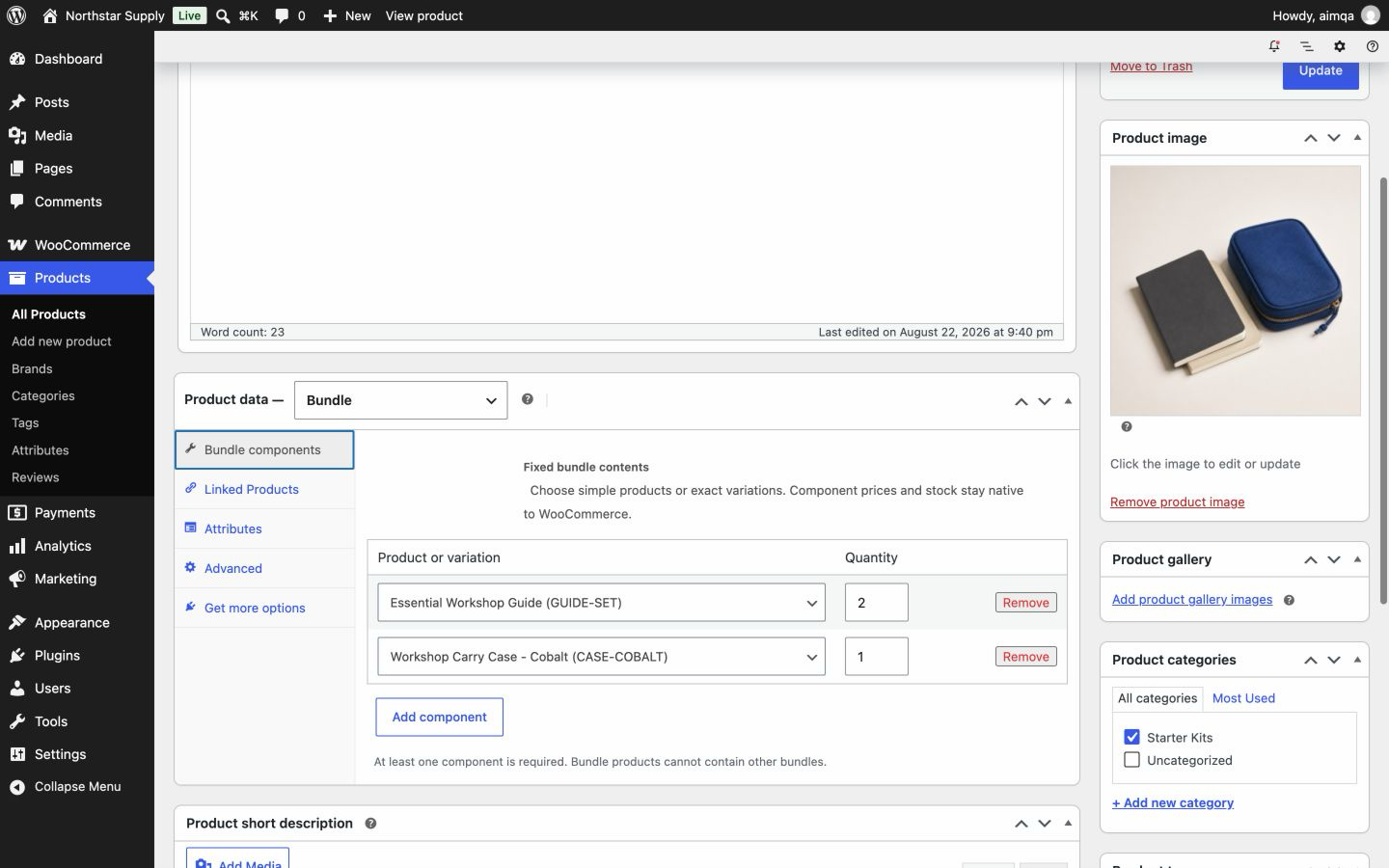
Open Bundle components. Select a simple product or an exact variation, then set its quantity. Select Add component for each additional item.
Example: a workshop starter kit with one Workshop Notebook and two Blue Marker Sets.
Add at least one item. Use simple products or exact variations as items, not other bundles.

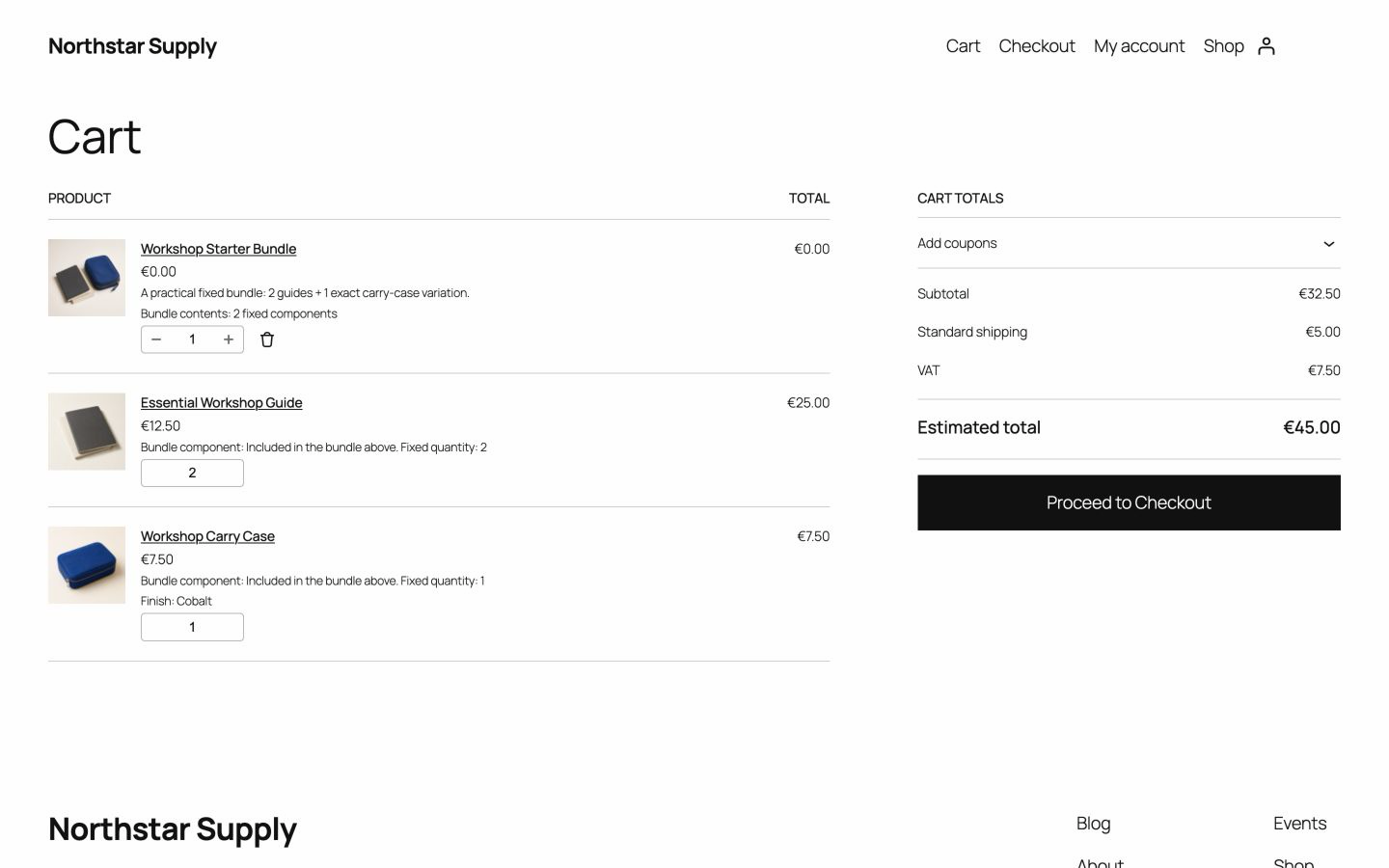
Publish the product and add it to the cart from its product page. Check each item, quantity, price, shipping charge, tax amount, and the final total.
Try this flow in the live demo (opens in new tab)
The customer buys one bundle. WooCommerce still manages each item on its own line.
The bundle total is the sum of the current item prices. Each item keeps its own tax data.
Physical items keep their own shipping data.
Orders keep the name, SKU, quantity, and total of each purchased item. Item refunds restore stock once.
Yes. Create a separate bundle product for each version. Choose the exact variation that each bundle includes.
If the required quantity is not available and backorders are not allowed, customers cannot buy the bundle. Stock is checked in the cart and again at checkout.
Yes. Orders keep the details of each purchased item. Later product edits do not change past orders.
Also from we-wp: Advanced Invoices creates numbered PDF invoices from your WooCommerce orders. Advanced Quotes turns price requests into paid orders.
Want the full picture? See what Advanced Bundles Free includes.
Download Advanced Bundles Free and build your first kit with your own products.
v0.1.0 · 54 KB · WordPress 6.8+ · WooCommerce 9.9+ · PHP 8.2+ · GPL-2.0-or-later
Opens the GitHub release page.
Need help installing? Follow the installation steps.