Updated
WooCommerce product kit guide
WooCommerce product kits: fixed or configurable?
Use a fixed product kit when every customer gets the same products and quantities. Use a configurable product builder when customers must choose parts, options, or quantities.
v0.1.0 · 54 KB · WordPress 6.8+ · WooCommerce 9.9+ · PHP 8.2+ · GPL-2.0-or-later
Opens the GitHub release page.
Need help installing? Follow the installation steps.
Example
A team starter kit, ready in one click
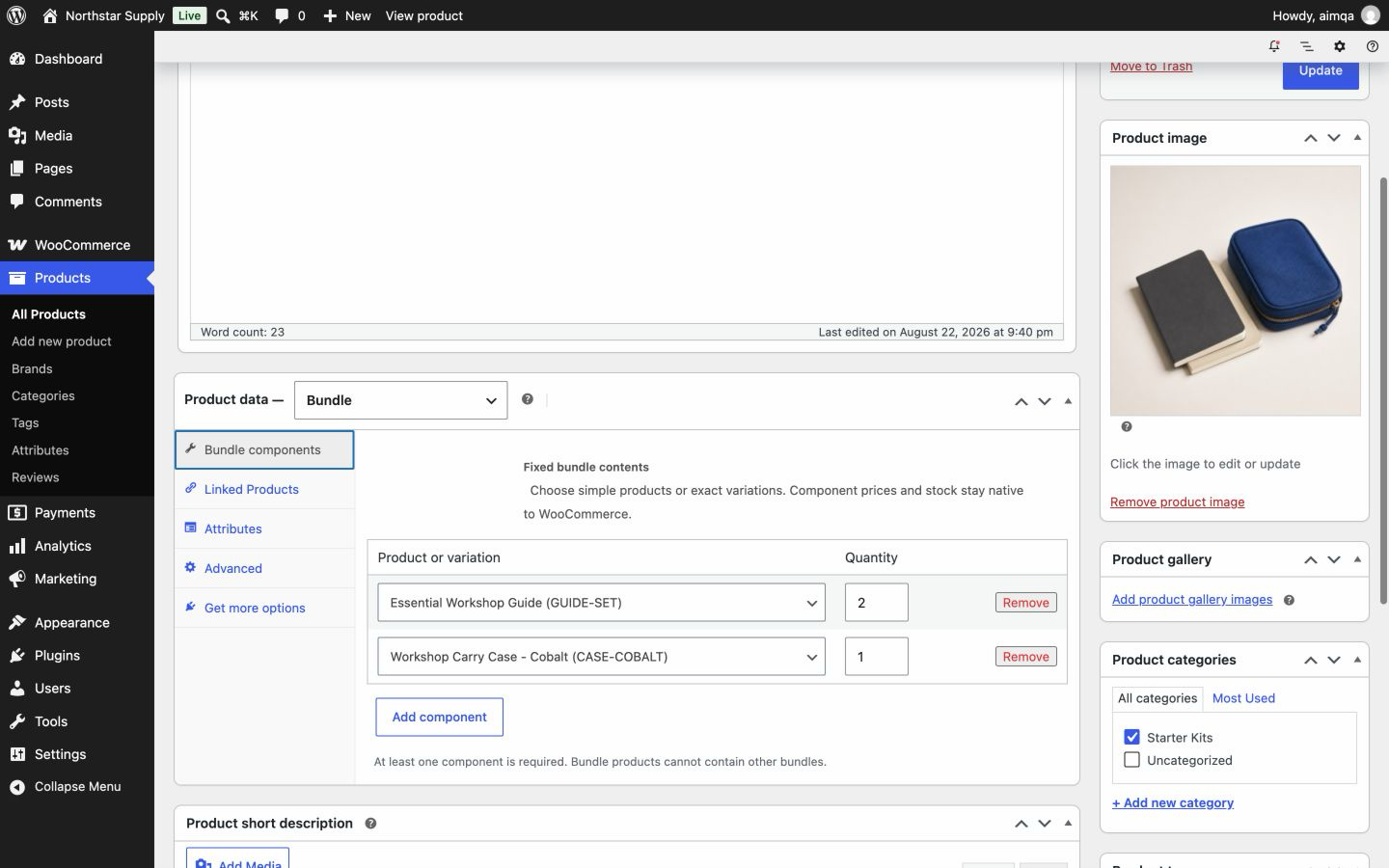
Advanced Bundles Free sells fixed kits. You set the contents once, and every shopper gets the same complete set.
For example, your team starter kit holds one Blue, Medium T-shirt, one cap, and one bag. Shoppers add the whole kit with one click. The total is the sum of the current item prices, and each item keeps its own stock. The order lists every item for order review and refunds.
Want a larger version? Create a separate Complete kit bundle product with its own contents and product page.

Direct comparison
Fixed kit or configurable product?
A fixed kit has one recipe set by the store. A configurable product asks the customer to build the recipe.
| Question | Fixed product kit | Configurable product |
|---|---|---|
| Who chooses the contents? | The store owner sets every required product, exact variation, and quantity. | The customer chooses from available components or options. |
| What happens to stock? | Each component keeps its WooCommerce stock rules. The cart checks the combined quantity needed for each product. | Stock depends on the components the customer selects. |
| How is price calculated? | Advanced Bundles Free totals each component's current price multiplied by its quantity. | The total may change with selected components, options, or pricing rules. |
| Best fit | Repair kits, starter packs, and standard product sets. | Custom computers, cameras, gift boxes, and build-your-own products. |
Setup
Build a fixed kit in four steps
-
Create the kit product
Open Products → Add New. In Product data, choose Bundle.
-
Add the kit items
Open Bundle components. Select each simple product or exact variation and set its quantity.
-
Publish the kit
Add the name, images, and description that shoppers see, then publish.
-
Test the cart
On a staging site, add the kit to the cart. Check the items, prices, stock, shipping, and tax.
WooCommerce product kit questions
What is a WooCommerce product kit?
A product kit sells several products together in one purchase. A fixed kit always contains the same items. A configurable kit lets customers choose some or all of its contents.
Can a fixed product kit include variations?
Yes. You add one exact existing variation, such as the Blue, Medium T-shirt. Bundle exact variations.
Can I offer a starter kit and a complete kit?
Yes. Create each kit as a separate bundle product. Each one has its own contents, product page, and total.
How does a kit use stock?
Each item keeps its own WooCommerce stock rules, including backorder settings. The cart checks the combined quantity needed for each product, even when a shopper adds the kit more than once.
Related guides
Also from we-wp: Advanced Invoices creates numbered PDF invoices from your WooCommerce orders. Advanced Quotes turns price requests into paid orders.
Want the full picture? See what Advanced Bundles Free includes.
Need the same products in every kit?
Download Advanced Bundles Free, follow the setup guide, and test your first kit on a staging site.
v0.1.0 · 54 KB · WordPress 6.8+ · WooCommerce 9.9+ · PHP 8.2+ · GPL-2.0-or-later
Opens the GitHub release page.
Need help installing? Follow the installation steps.